

Hey students! If you’re tired of subscription costs piling up, I’ve got some great news. Microsoft is giving away 12 months of Microsoft 365 Personal with Copilot AI absolutely free to college students. Yes, you read that right – a full year, no credit card charges, and you get all the premium features worth nearly $100.
Being student is very rewarding as we have posted many such deals about Jio Student offer, Canva Student Offer, Airtel Free Perplexity offer and lot more.
Let me break down everything you need to know about this amazing offer and how to claim it before it’s gone.
What Exactly Are You Getting?
This isn’t some watered-down student version. When you redeem this offer, you’re getting the full Microsoft 365 Personal subscription that normally costs $99.99 per year or $9.99 per month. Here’s what’s included:
- All the Office Apps You Need
- Copilot AI Built Right In
- 1TB One Drive Storage
Who Can Get This Deal?
The offer is available to college and university students. Here’s what you need to qualify:
- You need a .edu email.
- You must be enrolled at an accredited college or university
- Both full-time and part-time students are eligible
- Undergraduate and postgraduate students can apply
- Community college students are included too
- You can’t already be a Microsoft 365 Personal student subscriber
How to Claim Your Free Year – Step by Step
Step 1: Visit the Microsoft Copilot for Students Page
Step 2: Click “Redeem Free Offer”
Join Our Community Channels
Save Upto Rs.10,000 Per month with exclusive offers and deals. Get instant alerts!
You’ll see a big button to redeem the offer. Click it!
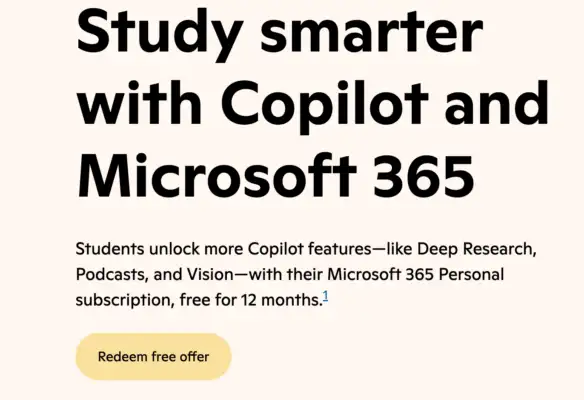
Step 3: Sign In with Your Microsoft Account
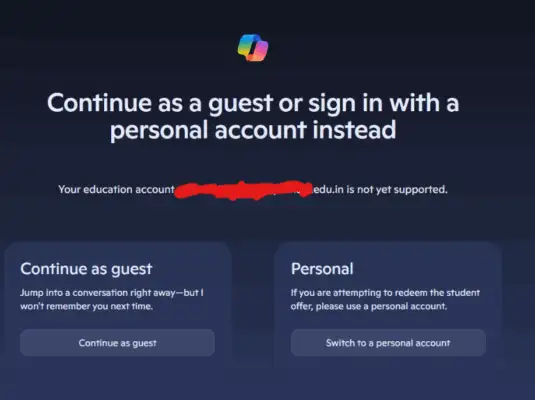
Here’s something important: use your personal Microsoft account (like Outlook.com, Hotmail, or Live). Don’t use your school account for this. If you don’t have a personal Microsoft account yet, you can create one for free.
Step 4: Verify You’re a Student
This is where you’ll need to prove you’re actually enrolled. Microsoft accepts several types of verification:
- Your school email address (usually ends in .edu or .ac.uk)
- A current student ID (with a date visible)
- Your acceptance letter
- A current class schedule
- An enrollment verification document
- An International Student Identity Card
Have one of these ready before you start the process.
Step 5: Add a Payment Method
You’ll need to provide payment information, but here’s the important part: you won’t be charged during your free 12-month period. Microsoft just needs this on file for if you decide to continue after the free year ends.
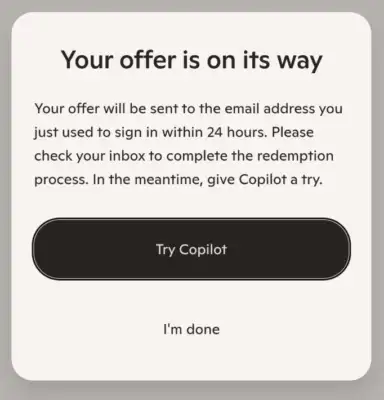
Step 6: Check Your Email
Within 24 hours (sometimes sooner), you’ll get an email from Microsoft confirming your subscription is active. Make sure to check your spam folder if you don’t see it in your inbox.
Frequently Asked Questions
Do I really not need a credit card to get the free year?
You do need to provide payment information when signing up, but you won’t be charged during your free 12 months. Think of it like how Netflix or Spotify asks for payment info during free trials.
What if my school doesn’t give out .edu email addresses?
No problem! You can verify your student status using other documents like your student ID, enrollment letter, or current class schedule.
Can I share this with my roommates or family?
No, Microsoft 365 Personal is designed for one person. If your family wants Microsoft 365, they’d need to look at the Microsoft 365 Family plan (which isn’t part of this student offer).
Will this work on my Mac or Chromebook?
The full desktop apps work great on Mac. For Chromebooks, you’ll use the web versions of the apps, which are still pretty powerful and include Copilot features.
What happens to my files if I don’t renew?
You won’t lose your files. They’ll remain in your OneDrive, but if you don’t maintain a subscription, your storage will be reduced to the free tier (5 GB). You’d need to download or delete files to get under that limit.
Is this available for high school students?
This particular 12-month free offer is specifically for college and university students. High school students aren’t eligible for this promotion.