
PhonePe & GPay LPG Booking Blocked? How to Fix LPG Cylinder Booking Issues
PhonePe LPG Cylinder Booking Blocked
PhonePe LPG Cylinder Booking Blocked – Hi friends, we are seeing a major shift in how digital payments for utility bills are processed. Users are reporting that PhonePe and Google Pay are blocking LPG cylinder bookings if the mobile number used on the app does not match the registered mobile number with the gas provider (Indane, HP, or Bharat Gas). This is a significant update for anyone relying on Cashback Offers and Free Recharge Tricks to save on monthly expenses.
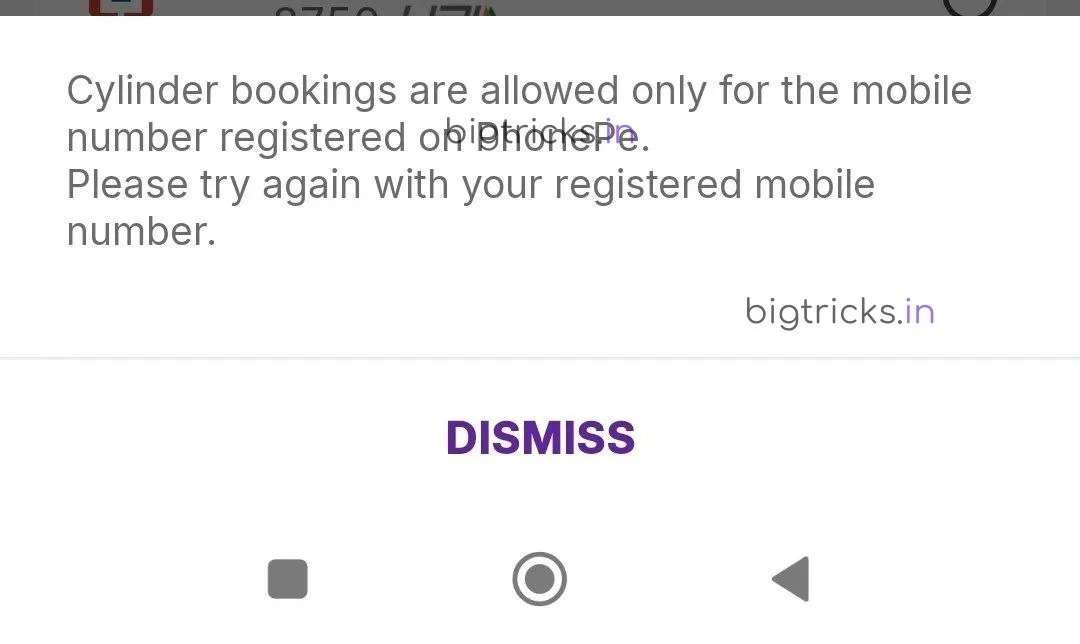
We have another loot offer insight for you guys, which is from the digital payments space. Recently, multiple users on platforms like DesiDime have confirmed that GPay and PhonePe have started strict verification. Paytm is also expected to follow suit starting May. If you frequently book cylinders for family members using your own account to grab Freebies or rewards, you might face a “Booking Failed” or “Number Not Found” error.
Why is PhonePe Blocking LPG Cylinder Bookings?
The primary reason behind this restriction is the implementation of stricter KYC and data mapping protocols. Payment apps are now verifying the LPG-registered mobile number against the app’s registered profile. This move aims to reduce fraudulent transactions and ensure that subsidies or delivery tracking reach the correct consumer. While this helps in security, it creates a hurdle for those looking for the best Loot Deals across multiple accounts.
How to Use LPG Booking Without Restrictions
If you are facing issues while booking your next refill, follow these verified workarounds to ensure you don’t run out of gas:
1. Use the Amazon Pay app, as it currently allows booking without the strict mobile number matching restriction.
Join Telegram for Instant Updates
2. Create a new PhonePe or GPay account using the actual mobile number registered with your gas agency (Indane/HP/Bharat Gas).
3. Use the official LPG Provider Apps (like IndianOil One or HP Pay) and pay via UPI to still get some Cashback Offers.
4. Update your mobile number in the LPG distributor’s database to match your primary payment app number.
Download BigTricks App for More Hacks
Comparison of Payment Apps for LPG Booking
| Platform | Matching Number Required? | Current Status |
|---|---|---|
| PhonePe | Yes | Strictly Enforced |
| Google Pay | Yes | Strictly Enforced |
| Paytm | Partial | Starting May 2024 |
| Amazon Pay | No | Working Fine |
Important Points to Remember
- Always check if your Consumer ID is linked correctly before paying.
- The average price of a cylinder is around ₹800 – ₹950 depending on your state; ensure you have sufficient balance to avoid failed transaction blocks.
- Check our Refer & Earn Offers section to earn extra wallet balance for your bills.
Frequently Asked Questions (FAQ)
Why is my LPG booking failing on PhonePe?
It is likely because your PhonePe mobile number is different from the mobile number registered with your Gas Distributor.
Can I still get cashback on LPG bookings?
Yes, you can use Amazon Pay or specific Credit Card Reviews on our site to find cards that offer 5% cashback on utility bills.
Is Paytm also blocking non-registered numbers?
Reports suggest Paytm will implement similar verification steps starting in May, so it is better to align your numbers soon.
For more such updates on Offers and technical workarounds, stay tuned to our WhatsApp Channel.


Join the conversation