
[AutoPlay Trick Added] Google Pay Tez Shots- Play Cricket, Score & Win Scratch Cards
Google Pay Play Tez Shots & Win Scratch Cards – Hello Guys, Google Pay is Here with a New Fun Offer. Here in Google Pay’ Latest Version of the app, You Can Play Cricket Game & Score. Based Upon the Score You Will get various Scratch Cards. You Can Get A Random amount of Cashback on Specified Transactions. 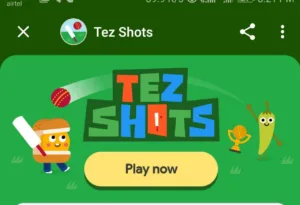
The Rewards Starts from 100 Points, You will get Your First Reward Activated when your Total Score reaches to 100 and Son next Milestone is 300 and this goes to 1000+ So Score high & Get The Rewards in Your Bank Account. You Can Get Rewards on Money Transfer Using Google Pay & Bills & Recharges. You Can Refer Friends on Google Pay & Earn Direct Cash in Bank Account.
The Game is Simple You Just need to Press the Bat Icon at the right time & score high. You can Play Unlimited times & Score as much as you want.
MileStones & Rewards –
| Total score | scratch card | |
|---|---|---|
| 50 | Coolwinks Voucher Worth up to ₹450 | |
| 100 | Ajio Rs.400 off on Rs.1399 Coupon |
|
| 150 | 5Paisa : Rs.500 & a Chance to win Rs.50000 |
|
| 200 | Mfine: Rs.400 off online doctor consultation | |
| 300 | Upto Rs.650 peter England voucher | |
| 500 | Ovenstory : 80 off on 199 | |
| 700 | Discovery : 100 Off on 1 year Subscription | |
| 1000 | Yatra Rs.300 off on Domestic flights | |
| 1000+ | Rs.1 Lakh Lucky Draw | |
| 1500+ | Rs.20 Cashback |
How To Play Tez Shots in Google Pay App?
- Download Latest version of Google Pay App From Playstore – Download Google Pay
-
Now Complete Your Signup & Bank Linking process, if You are a New user Send Rs.1 to any of your friends to get additional Rs.51 Cashback.
-
Now Click On The Google Pay Tez Shots Link & Open it in Google Pay App.
- Now Read Rules & Start Playing Cricket in Google Pay.
-
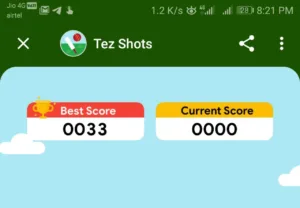
You Can Start the Match & Score as much as you want.
-
You Can play Unlimited times. Your cumulative scores will be counted.
-
Once You are Done, You can see the Scratch card on The Rewards section.
-
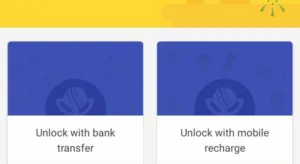
The Scratch cards need to be unlocked by doing required transactions Like, Send Money, Recharge or Bill Payments.
-
once You have done the transactions, Rewards will be yours.
Proof –
Trick To Order Free Tshirt From Peterengland
Once You have collected 300 points, You will get Upto Rs.600 peter England voucher which you can redeem 100% on peter England website. You will Get Credits to your wallet which you can use either the nearest store or order online. The shirts starting at Rs.500 on Website.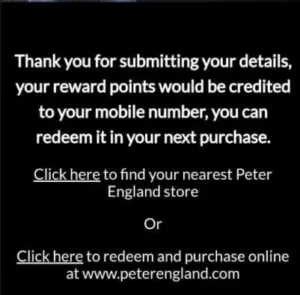
1. Redeem the Coupon you get in Google Pay Click Here to Redeem
2. Now The wallet credited to your Peterengland account
Suggestions to Buy – Click Here | Shirts Click here
3. Order anything and Apply the credits to your purchase
4. Done, You got free Tshirt or Some amount needs to be pay if you get lesser than 650 in the voucher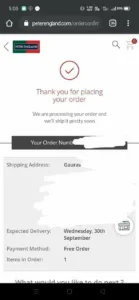
Tez Shots Auto Play Trick –
Now You Can AutoPlay The Shots Game & Earn Scratch Cards, Just Follow the Below Trick to Get Started,
-
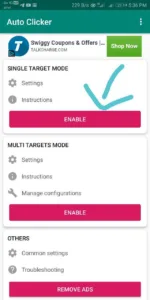
First of Download Auto Clicker App From Playstore – Download Now
-
Now Just Install the App & Provide Accessibility Permissions.
-
Now Open Both the Apps & Click on Cricket Game Link in Google Pay.
-
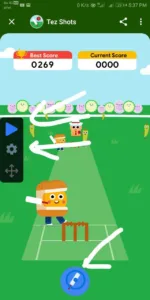
Now Place the Marker on the Bat Icon, In Setting Select Interval 50 millisecond & Press the Start Button.
-
Now Autoclicker with Start Auto clicking & You Will Score.
Game rules –
This game is only available on Android app version 34.0.001_RC01 or above. Upgrade to the latest version to play.
- This is a limited-time promotion and Google reserves the right to end it at anytime without notice.
- You can play as many times as you like during the promotion period. Your total score is the sum of runs in all the games that you played. If you exit a game before it ends, the score for that game will not be added to the total score.
- Whenever you reach a total score that is indicated as a “milestone” in the game, you will earn a locked scratch card.
- To unlock the scratch card and earn the reward, you must successfully complete the qualifying transaction assigned to the locked scratch card during the offer period as mentioned in the terms and conditions.


I have redeemed my voucher and got message in my no. But not same received in my account. When we get in our account.
It takes around 30 Minutes to credit. Please wait, You will get an SMS then You Can Redeem
Bro it’s saying you have to visit nearest shop to redeem this and minimum purchase of 1000 rupees
I used this auto clicker first i given 50 milliseconds but out the game so i given 40 milliseconds then it crossed the 20 sixes then out after it showing oh your lost and refresh so i close and open it showing my previous high score only so I tried multiple times so what’s the solution for this
Bro i have redeemed but i didn’t had account when I redeemed i created the account now so how can i get the points
The Points will be Credited to Your Mobile number, You can create account later after redemption also with the same number
The points can be used for particular products or in any product
I am using the loyality points always it’s showing OTP error while entering the correct OTP
Same bro
cannot use loyalty points with the coupons applied on cart
Ye error aa raha hai chahe kitna hi cart value ho 300 500 ya 3000 bhi sab pr yahi error hai
cannot use loyalty points with the coupons applied on cart
Ye error aa raha hai chahe kitna hi cart value ho 300 500 ya 3000 bhi sab pr yahi error hai
Bro i have redeemed and received msg ur acc has been credited 1000 points but i didn’t had account when I redeemed and i created the account . Almost 6 hours done but still points not credited in my account. Why?
When I played setting a time of 1 hour “auto clicker” stop automatically after 10 minutes, how to solve the problem.
Redeem success,
But Loyalty points message not received yet
500 free https://gpay.app.goo.gl/j6dk84
Join the conversation