


Recently, we have shared a Trick to get 1-Year Perplexity AI premium subscription with Airtel. Now we are sharing a legit way to get a Google Gemini Pro subscription free for 1 year and enjoy 2TB free storage. If you’re a university or college student in India or the US, Google’s latest offer is an absolute game-changer. This post breaks down how to claim it, why it’s valuable, and tips to maximize the benefits!
The Trick Part: You don’t need to be a student to get the offer, just follow the steps to get it free for 1 year
What is Google Gemini Pro?
Google Gemini Pro is Google’s premium AI-powered suite – featuring Gemini 2.5 Pro, Deep Research, NotebookLM (enhanced notes and study tools), Veo 3 for AI video creation, and seamless integration with Google Workspace. The plan includes 2TB of cloud storage across Drive, Gmail, and Photos, making it perfect for students and professionals alike
Why Is This Student a Big Deal?
- Usual Gemini Pro annual cost: Rs 19,500 (India) or $20/month (US)
- Includes powerful AI tools for research, writing, and creativity
- Generous 2TB cloud storage—ideal for storing assignments, files, and media
- Access advanced features like unlimited homework help, Deep Research, and more
- Tremendous value compared to competitors (like ChatGPT Plus, which lacks integrated storage)
How to Get Google Gemini Pro Subscription Free For 1 Year (Students)
Follow these steps to claim your complimentary Gemini AI Pro subscription and storage:
Join Our Community Channels
Save Upto Rs.10,000 Per month with exclusive offers and deals. Get instant alerts!
1. Verify Eligibility: You must be a college/university student, at least 18 years old, with a valid institution email (.edu in US; college email in India).
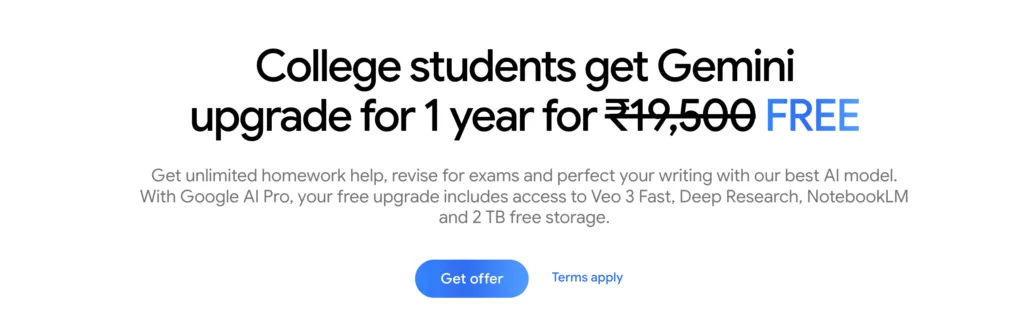
2. Visit the Offer Page: Go to the official
3. Sign In With Your Student Email: Sign in using your verified student email ID. If you don’t have a student email, follow the steps below Trick to get a Student ID

4. Now, you will be asked to log in with your institute email ID. If you don’t have student email ID then put your google email ID

- If you don’t have an email ID of the institute. You can also upload your Student ID card.
- If you are not a student, you can go to Canva or the Student ID creator app to create your student ID.
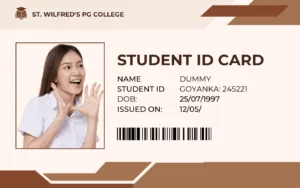
- Please note, keep your date of birth the same in the ID and form.
5. Once you log in with your student email ID, you will get the option to get an offer.

6. Click on ‘Get Offer‘, and now you need to add your UPI ID. You will not be charged; you just need to add your UPI for auto payments. [We can cancel the auto pay request instantly.] No money will be charged.
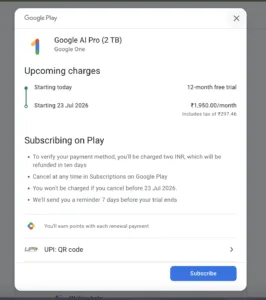
7. Activate the Plan: Follow the on-screen instructions to activate your free 1-year Gemini Pro plan.
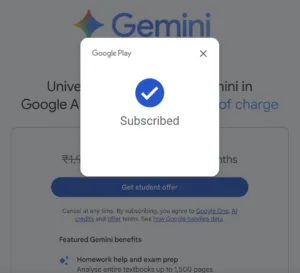
8. Now you can enjoy the Google One Services for free, which include 2TB of data storage and 1 year of Gemini Pro Subscription.
Note: Offer is available in select countries for a limited time (India: until September 15, 2025. US: enroll by June 30, 2025)
How to Remove Autopay From UPI Apps
- Once done, your autopay request will be successfully disabled.
- Open your app and navigate to the Autopay Request section.
- Find and select the Google Autopay Request you wish to cancel.
- Click on Cancel Autopay.
- Enter your UPI PIN when prompted to confirm cancellation.
Key Features You Get with Gemini Pro + 2TB Storage
- Gemini 2.5 Pro: State-of-the-art AI understanding, creative writing, research assistance, and coding support
- 2TB Google Storage: Store thousands of files, photos, and videos worry-free
- Deep Research: In-depth summaries and breakdowns of complex topics
- NotebookLM + Flow: Enhanced research notes & AI video storytelling
- Gemini in Workspace: Advanced AI features in Gmail, Docs, Sheets, and more
Tips to Maximize Your Gemini Pro Subscription
- Use Gemini for exam prep, resume writing, and project support
- Backup all your academic files in Drive for the year—eliminate data loss worries
- Leverage Gemini’s AI tools in Google Docs to draft, edit, and optimize papers
- Try out Gemini’s creative tools like Veo 3 for video stories and Whisk for AI art
- Read advanced tips for AI-powered productivity on sites like
Comparison: Google Gemini Pro vs. Other AI Tools for Students
| Feature | Google Gemini Pro | ChatGPT Plus | Microsoft Copilot Pro |
|---|---|---|---|
| Annual Cost | Free for eligible students (otherwise Paid) | Paid | Paid |
| Cloud Storage | 2TB (incl.) | None | Limited |
| Advanced AI Tools | Yes (Gemini 2.5 Pro, Veo 3, etc.) | Yes | Yes |
| Integrated with Google Workspace | Yes | No | Integration with MS Office |
Frequently Asked Questions (FAQ)
Q: Who is eligible for the free Google Gemini Pro offer?
A: Only college and university students (18+) with a valid student email in supported countries (e.g., India, US)
Q: When does the offer expire?
A: India: Until September 15, 2025 | US: Sign up by June 30, 2025. Check regional pages for current deadlines.
Q: What happens after the free subscription ends?
A: You’ll receive an email before expiry and can choose to continue as a paid subscriber or cancel
Conclusion: Claim Your Free Google Gemini Pro & Boost Your Productivity
Don’t miss out on this unparalleled Gemini Pro student offer—with cutting-edge AI tools and massive storage, it’s perfect for serious students and future professionals. Sign up before the deadline, and supercharge your learning, writing, and creative projects with Gemini Pro for free!
Looking for more AI hacks, productivity tips, and secret deals? Check out to stay ahead in the AI-powered world!