

Will Google Delete Your Data? The Risks of Cancelling Google One Storage
Google One Storage Data Deletion – Hi friends, staying informed about your digital storage is crucial in an era where we rely on cloud services for our most precious memories and documents. Whether you are looking for Free Recharge Tricks, hunting for Freebies, or analyzing Credit Card Reviews to pay for your subscriptions, understanding the terms of service is vital for data safety.
We have another important blog for you guys, which is from the world of cloud management. If you’ve ever wondered what happens when you stop paying for extra space, this guide is for you. Before we dive in, you might also want to check out our guide on how to recover deleted photos on Android if you’ve already lost important files.
The Hidden Reality of Google Storage Limits
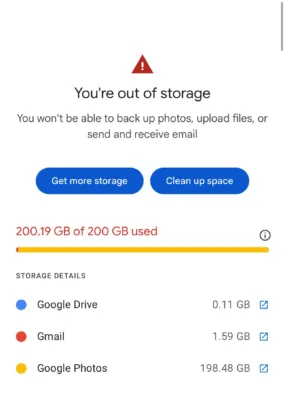
Most people don’t know this: Google could eventually delete your data if you aren’t careful. When you cancel a Google One subscription and your usage remains above the standard free 15GB limit, your account enters an “over quota” state. While your files won’t vanish the second your payment stops, the clock starts ticking on your digital archives.
If you are currently looking for ways to extend your storage without the high cost, check out this trick to get Google Gemini Pro for 1 year which includes 2TB of storage. You can also save on various digital services by checking out Amazon Pay cashback offers.
How to Manage Your Data After Cancelling Google One
- Check your current storage usage at drive.google.com/settings/storage.
- Identify large files in Google Drive and Google Photos that exceed the 15GB free tier.
- Download and backup your data locally or to another cloud service.
- Delete unnecessary files to bring your account back under the 15GB limit.
The 2-Year Deletion Rule Explained
Google states that if an account remains over its storage limit for 2 years, it may begin deleting data automatically. This policy applies to several key services:
- Gmail: Your incoming and outgoing emails.
- Google Drive: All uploaded files, including Docs, Sheets, and Slides.
- Google Photos: High-quality and original quality backups.
Google typically sends multiple warnings and notifications before any deletion happens. However, if those warnings are ignored, years of data could eventually be at risk. It is always better to stay updated with Offers and Cashback Offers to keep your subscriptions active at a lower cost.
Google Storage Policy Summary
| Storage Status | Immediate Effect | Long-term Consequence (2 Years) |
|---|---|---|
| Under 15GB | Full Service Access | Data remains safe |
| Over 15GB | Cannot upload/receive emails | Risk of permanent deletion |
Important Points to Remember
Before cancelling, ensure you have a backup plan. If you are looking for Refer & Earn Offers to fund your subscriptions, join our community for the latest updates.
Stay connected for the latest Loot Deals and tech tips:
- Join our Telegram Channel
- Follow our WhatsApp Channel
- Download the BigTricks App
Frequently Asked Questions
Will my emails be deleted immediately after I cancel?
No, your emails are not deleted immediately. However, you will not be able to send or receive new emails until you are under the 15GB limit.
How much is the free storage limit?
Google provides 15GB of free storage shared across Google Drive, Gmail, and Google Photos.
Does Google warn users before deleting data?
Yes, Google sends multiple notifications to your registered email address over a 24-month period before taking action.



Join the conversation