

Have you seen that amazing trend flooding social media? People are transforming their photos into realistic miniature collectable figurines, complete with custom packaging and even short, animated videos. It looks like something that would require complex 3D modelling software, but the secret is a simple, two-step AI process that anyone can do.
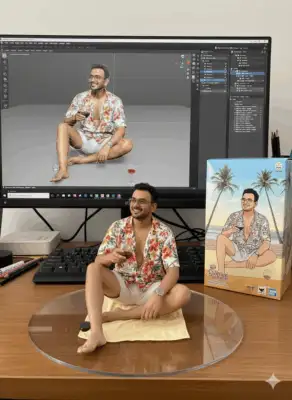
People are using Google’s Nano Banana Model to generate such images. This is available on the Google Gemini website. It’s available for both free and pro users. If you want a 1-year Google Gemini Pro subscription, you can also check out How to Get Gemini Pro Subscription Free for 1 year
Ready to create your own? Let’s break it down. 🤖✨
Step 1: Create Your Miniature Figurine Image with Google Gemini
The first step is to generate a high-quality static image of you as a collectable figure. We’ll use Google Gemini for this, as its image generation capabilities are perfect for this task.
- Open the Google Gemini app on your phone or go to the Gemini website.
- Upload a good photo of yourself. A clear, front-facing picture works best for this.
- Copy and paste the following detailed prompt into the text box along with your photo:
Join Our Community Channels
Save Upto Rs.10,000 Per month with exclusive offers and deals. Get instant alerts!
Prompt for a 3D miniature of your photo
create a 1/7 scale commercialized figurine of the characters in the picture, in a realistic style, in a real environment. The figurine is placed on a computer desk. The figurine has a round transparent acrylic base, with no text on the base. The content on the computer screen is a 3D modeling process of this figurine. Next to the computer screen is a toy packaging box, designed in a style reminiscent of high-quality collectible figures, printed with original artwork. The packaging features two-dimensional flat illustrations.
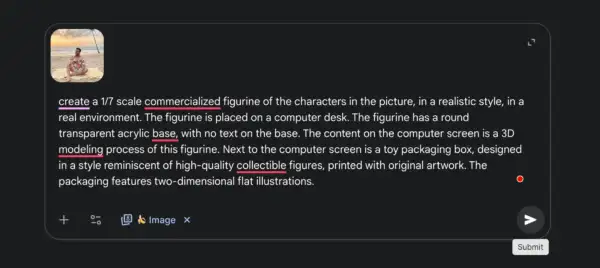
- Generate the image. Gemini will process your photo and the prompt to create a stunning image of you as a miniature collectable, sitting right next to a computer displaying its “3D model.”
- Download your new image!
Step 2: Animate Your Image with PixVerse.ai
Now that you have the perfect picture, it’s time to bring it to life with a short video. This is the magic touch that makes the trend so captivating.
- Go to the PixVerse.ai website in your browser.
- Upload the image you just created and downloaded from Gemini.
- In the prompt box, enter this simple command:
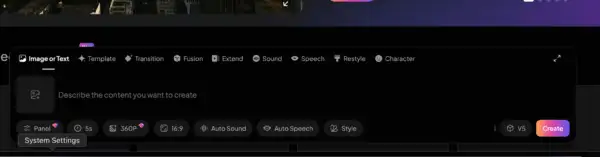
This 3d model is in someone’s hand
- Click “Generate.” PixVerse’s AI will interpret your static image as a 3D object and create a short video clip that makes it look like someone is holding and presenting your figurine.
- Download the video.
And that’s it! You now have a high-quality image and a viral-worthy video of your very own miniature figurine. This two-step process shows just how accessible and powerful modern AI tools have become, allowing anyone to jump on creative trends in minutes.